Snap a Receipt. AI Files the Expense.
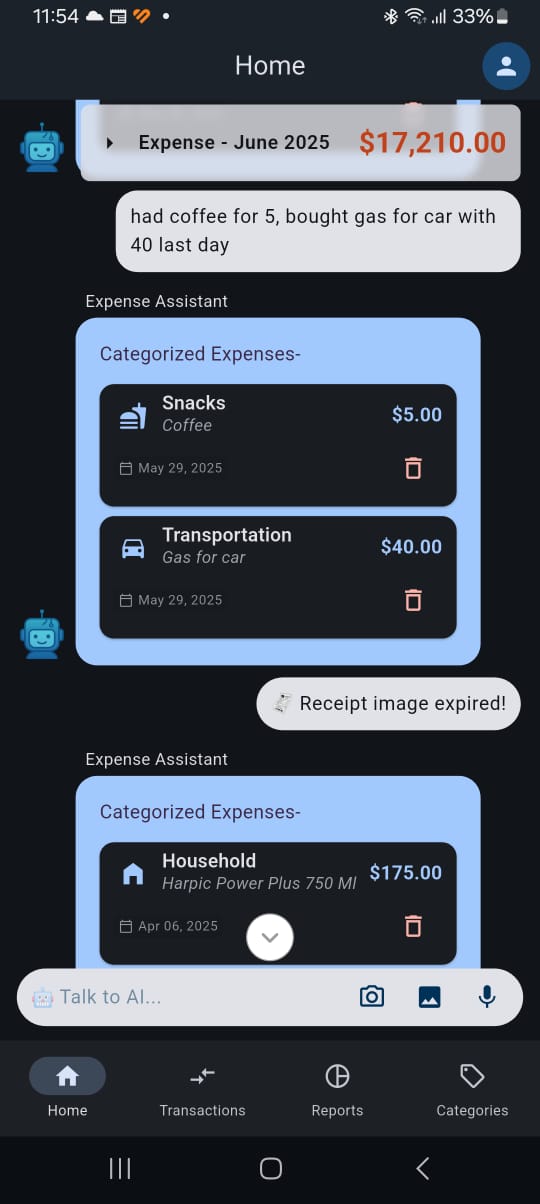
Take a photo of any receipt in the chat. ChatExpense reads every line, works out what you bought and when, and files it under the categories you already use. No typing, no forms.

What You Get
- ✓ Reads the items, amounts and date straight from the photo
- ✓ One receipt with several items becomes several expenses
- ✓ Uses the receipt's date, so last week's lunch lands in last week
- ✓ Matches each item to your own categories, not a fixed list
- ✓ Works from the web app and the Android app
Frequently Asked Questions
Yes. Send a photo of a receipt in the chat and ChatExpense extracts the items, amounts and date, then files them as expenses in your categories.
Each item can become its own expense, each in the category that fits it.
Yes. The expense is recorded on the receipt's date, so reports and monthly totals stay accurate even when you scan it days later.
The free plan includes a monthly allowance of receipt scans. Pro and Power User plans include more.